 How to resolve AdBlock issue?
Steinberg Cubase 16
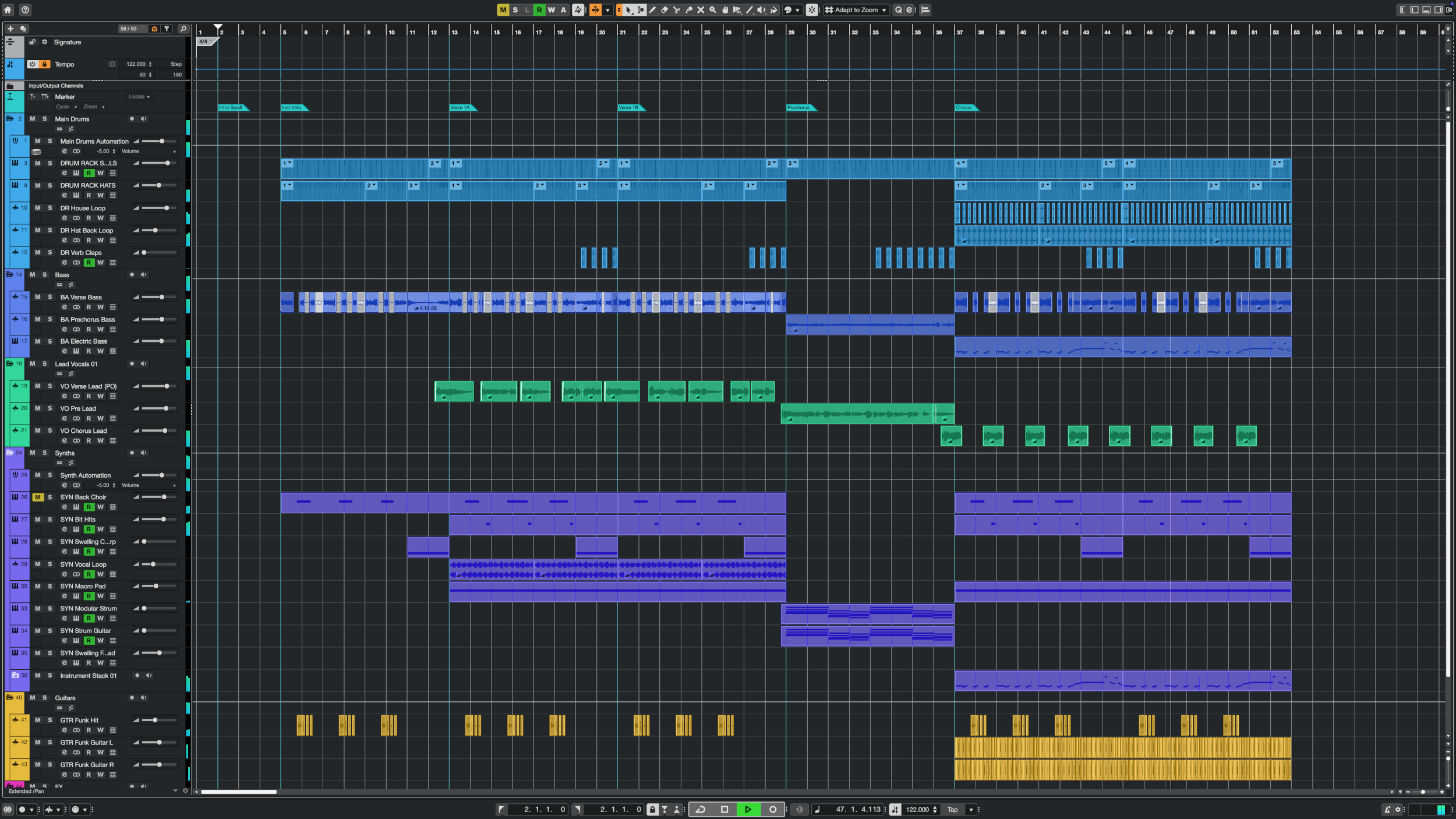
Steinberg has today announced the immediate availability of Cubase 16, the latest version of its award-winning digital audio workstation (DAW). Used by musicians, songwriters, producers, and composers across a wide range of musical styles, Cubase combines powerful tools for recording, MIDI sequencing, composing, editing, and mixing in one comprehensive music production environment. Building on decades of innovation and feedback from its global user community, Cubase 16 introduces exciting new creative possibilities alongside significant improvements to everyday production workflows.
From creating layered instrument sounds and extracting individual elements from recordings to working with tempo, editing MIDI, and configuring the production environment, Cubase 16 makes music production faster and more intuitive. New instruments, effects, and sound libraries provide additional inspiration, while refinements throughout the application help users stay focused on making music. Available in three editions, Pro, Artist, and Elements, Cubase 16 offers a comprehensive music production environment for everyone from aspiring musicians to experienced producers and professional composers.
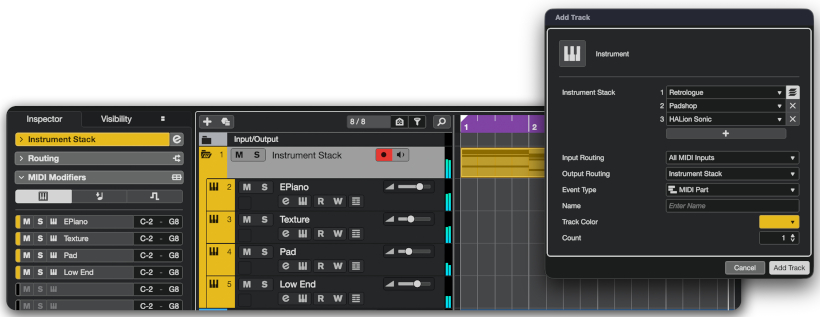
Cubase 16 introduces Instrument Stacks, making it easier than ever to create rich, layered sounds by combining multiple VST instruments, Sampler Tracks, and Drum Tracks into a single playable instrument. With flexible controls for individual layers, producers can quickly create sophisticated sounds and explore new sonic possibilities.
New tools in the Key Editor make MIDI editing more musical and intuitive. Strum adds natural timing variations to programmed chords, while the new Stretch Selection tool allows MIDI passages to be stretched or compressed directly, making it easy to adjust musical phrases or create effects such as accelerandos and ritardandos. For experimental sound design, new Spectral AudioWarp algorithms developed by Steinberg's HALion team deliver impressive results even at extreme time-stretching settings. From radically stretched vocals and instruments to atmospheric textures and evolving soundscapes, the new algorithms open up exciting possibilities for creative audio manipulation.
A major focus of Cubase 16 is improving everyday production workflows, with many refinements inspired by feedback from the Cubase community. The completely redesigned Settings dialog brings preferences, key commands, project setup, audio connections, and other configuration options together in one searchable interface. Users can quickly find and adjust the settings they need, while the new non-modal design allows changes to be made while continuing to work on a project.
Stem Separation has received a significant upgrade. Powered by the latest separation technology, the improved algorithm delivers higher-quality results and can now separate recordings into six stems: vocals, drums, bass, piano, guitar, and other instruments. This provides greater flexibility for remixing, sampling, and reworking existing recordings. Tempo Detection has also been significantly improved, combining a more advanced detection algorithm with a streamlined workflow. Whether working with freely recorded performances or imported audio, identifying and matching tempos is now faster and more straightforward.
Numerous additional improvements make a difference in daily use. MIDI Continuous Controllers can now be assigned meaningful names, making it easier to work with external synthesizers and instruments. The Audio Pool has been redesigned for more convenient media management, while improvements to plug-in handling and drag-and-drop functionality make common mixing and editing tasks faster and more intuitive. For demanding projects, an extended ASIO-Guard pre-processing buffer provides additional processing headroom, helping improve playback stability in sessions with large track counts and CPU-intensive plug-ins.
The new Quick Help system provides contextual information about Cubase functions directly within the application, making it easier to understand unfamiliar controls and discover functionality. Available in the Left Zone or a floating window, Quick Help will continue to expand with additional content in future updates. A new Guided Tour also helps users become familiar with the main areas of the Cubase interface.
Cubase 16 introduces a range of new creative tools, instruments, effects, and sounds designed to provide instant inspiration. Omnivocal Basic, powered by Yamaha's latest NX vocal synthesis engine, brings realistic singing voices directly into Cubase. With two included voicebanks, it provides a convenient way to sketch vocal melodies, develop songwriting ideas, and experiment with vocal arrangements. New Lyrics functionality in the Key Editor complements Omnivocal by allowing lyrics to be entered and edited directly alongside MIDI notes, including controls for pronunciation and language settings.
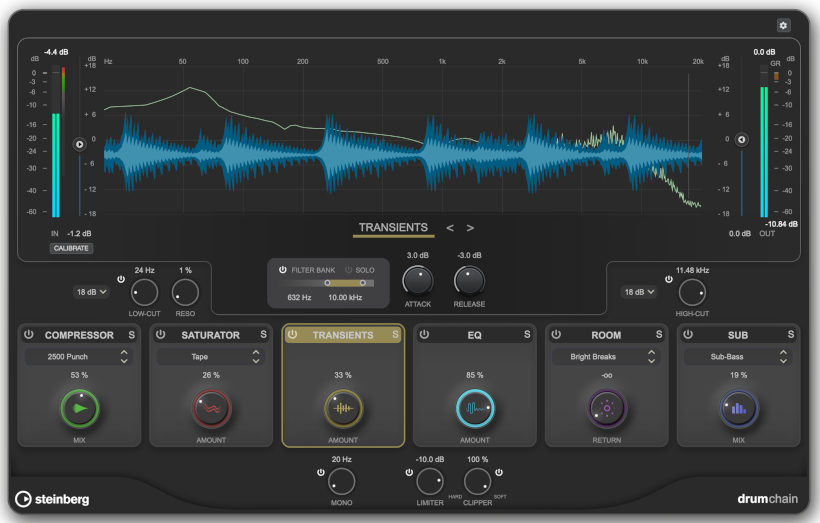
DrumChain, a new multi-effects processor designed specifically for drums, offers a similarly streamlined approach to shaping drum sounds, combining essential processing tools in a single plug-in. The new VocalTouch plug-in makes it easy to achieve polished vocal sounds. Its intuitive interface and ready-to-use presets provide instant results for different vocal styles and production requirements.
The new Module FM library introduces more than 200 presets created exclusively for Cubase 16. Based on the FM Lab synthesis engine, the library provides instantly usable leads, keys, basses, and textures designed for contemporary music production. Five new sample packs covering Afro House, Beats & Breaks, K-Pop, Latin Vibes, and Organic Sessions offer fresh, production-ready sounds and loops across a wide range of musical styles. Cubase 16 also features improved integration with Waves Illugen, providing convenient access to the service from the Right Zone and allowing generated samples to be imported directly into Cubase. Cubase 16 customers receive two months of complimentary access to Waves Illugen.
Alongside its new creative features, Cubase 16 introduces further improvements for professional production environments. The new external connections functionality makes it easier to integrate hardware synthesizers and outboard effects into Cubase Pro 16 by streamlining the setup of audio, MIDI, and synchronization connections. Expanded MIDI 2.0 support introduces additional possibilities for expressive performances and instrument control, including support for Note Expression and orchestral articulation messages with compatible instruments.
For complex mixing setups, Cubase Pro 16 now supports up to 16 audio sends per channel, doubling the previous limit, while the number of Control Room cue sends has increased from four to eight. This provides greater flexibility for extensive effects routing, sidechaining, and monitoring configurations. Support for Ableton Link makes it easier to synchronize tempo, beats, and transport between compatible applications and devices over a local network, opening up new possibilities for collaborative production and live performance. Additional improvements include M4A audio import support, enhanced video output capabilities, and numerous refinements throughout the application.
Matthias Quellmann, Senior Marketing Manager at Steinberg, commented: "With Cubase 16, we've focused on what matters most to our users: inspiring creative possibilities and an intuitive, efficient music production experience. Many of the improvements in this release are directly inspired by feedback from our community, helping musicians and producers turn their ideas into finished music faster than ever."
Cubase Pro 16, Cubase Artist 16, and Cubase Elements 16 are available from resellers and through the Steinberg Online Shop. The suggested retail price for Cubase Pro 16 is 599 euros or 599.99 US dollars. The suggested retail price for Cubase Artist 16 is 299 euros or 299.99 US dollars. The suggested retail price for Cubase Elements 16 is 99.99 euros or 99.99 US dollars. Prices may vary according to region.
A range of downloadable updates and upgrades, crossgrades, and education versions are exclusively available through the Steinberg Online Shop. Customers who have activated Cubase Pro 15, Cubase Artist 15, and Cubase Elements 15 or earlier versions from October 7, 2026, are eligible for a free, downloadable grace period update for their particular version of Cubase.
Key Features:
- Instrument Stacks for layering multiple instruments inside one playable stack with per-layer filtering and unified control [Pro • Artist]
- Improved Stem Separation adds enhanced quality, plus piano and guitar extraction [Pro]
- Tempo Detection introduces a redesigned workflow for faster, more reliable tempo matching [Pro • Artist • Elements]
- Key Editor Strum adds more natural timing and feel to programmed chords [Pro • Artist • Elements]
- Key Editor Stretch Selection allows melodies, basslines, and chord progressions to be stretched to the desired length [Pro • Artist • Elements]
- Module FM library brings more than 200 new HALion Sonic presets for modern, FM-based production sounds [Pro • Artist]
- DrumChain combines essential drum processing tools in an intuitive multi-effects plug-in, making it easy to shape and enhance drum sounds [Pro • Artist]
- VocalTouch assists with faster, more intuitive vocal shaping [Pro • Artist • Elements]
- Custom MIDI CC Names allow generic MIDI controller message names to be replaced with labels which match the instruments and hardware being used [Pro • Artist • Elements]
- Redesigned Settings dialog brings a searchable, consolidated setup and extra customization in one non-modal window [Pro Artist • Elements]
- Quick Help adds context-aware in-app guidance to the Left Zone or a floating window [Pro • Artist • Elements]
- Spectral AudioWarp allows extreme time-stretching and pitch-shifting with outstanding sound quality [Pro]
- Waves Illugen integration provides convenient access to custom sample generation directly from Cubase. Includes two months of complimentary access to Waves Illugen. [Pro • Artist • Elements]
- Five new sample packs to spark new ideas [Pro • Artist • Elements]
- Pitch Detection and Phase Inversion in the Sampler Track and Drum Machine for faster sample tuning and tighter drum layering [Pro • Artist]
- Omnivocal Basic to help with quickly developing vocal ideas [Pro • Artist • Elements]
- Workflow refinements add faster insert handling and more flexible drag-and-drop [Pro • Artist • Elements]
- Multiple video outputs allow video to be sent to more than one display destination [Pro]
- Windows MIDI support, built on the latest Windows MIDI platform for next-generation MIDI technologies in Windows 11 [Pro • Artist • Elements]
- Expanded MIDI 2.0 support for more expressive performances and orchestral articulation [Pro • Artist • Elements]
- Redesigned Audio Pool with cleaner media management [Pro • Artist • Elements]
- External Connections creates one streamlined workflow for setting up external instruments and effects with audio, MIDI, and synchronization [Pro]
- Key Editor Lyrics for adding and editing lyrics directly alongside MIDI notes, including fast step entry and pronunciation controls [Pro • Artist • Elements]
- AAC and M4A Import added for extended audio file support [Pro • Artist • Elements]
- 16 Audio Sends and 8 Cue Sends provide more routing options for bigger mix setups [Pro]
- Ableton Link adds easier sync with other compatible music apps [Pro • Artist • Elements] Links