 How to resolve AdBlock issue?
KORG Pa5X Operating System 1.5.0
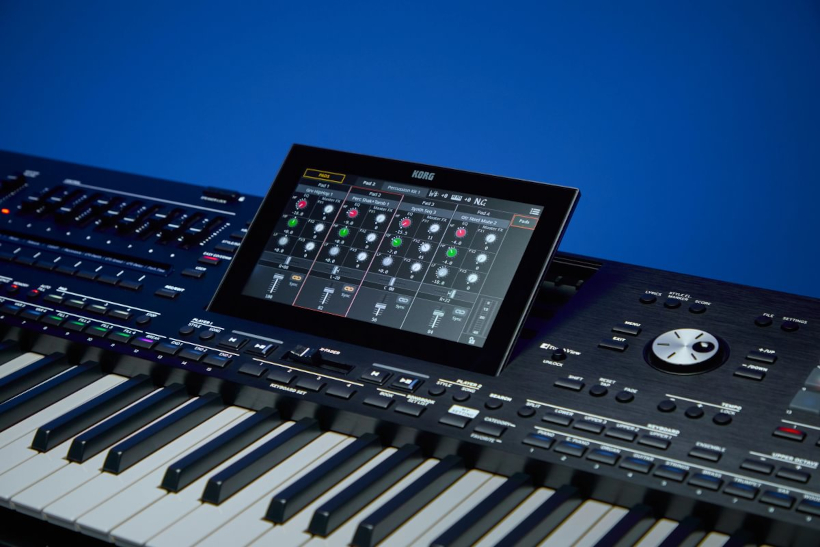
KORG announces version 1.5.0 of the Pa5X operating system, introducing 40 new Styles, enhanced Pad controls, more flexible Style creation, and improvements to editing and searching. Pa5X has always allowed users to import complete Styles from MIDI files, using markers to place sequences into their corresponding Style Elements. OS 1.5.0 introduces more flexibility by allowing users to import MIDI data into a specific Style Element and Chord Variation without affecting the rest of the Style. Musicians can create custom parts in an external sequencer or Pa5X Recording Studio, then import them directly into their Styles.
Pads can now start in sync with a Style or a Song. One Shot Pads play once when the Style starts. Loop Pads keep rolling until you stop them or the Style. Switch Sync on from Home > Menu > Pads and the Sync symbol appears in the Pad area of every Mixer page. The setting saves into User Styles and SongBook Entries, so the groove you built is waiting at the next gig.
Lock takes it further. Pads in Lock status keep playing when you change Styles or SongBook Entries and pick up only the new tempo. This helps maintain musical continuity when moving between Styles or SongBook Entries. Pa5X OS 1.5.0 also introduces 40 new Styles spanning pop, ballads, dance, rock, and more, giving musicians new starting points for performances, arrangements, and original music.
Undo arrives in Song Edit mode, matching what Style Edit already offered. A history view lets you step back through the last five editing actions, making it easier to experiment with changes without having to start over. Search results are now pre-selectable. Touch an item and it turns gray, marked and ready without loading anything. Once you're sure, send it to Player 1 or Player 2 with a dedicated button. Loading the wrong file mid-set just got a lot harder to do. A new Info button pulls up the details on a pre-selected file, from name and size to date and location. Hold the file path for about a second and a tooltip reveals the full path, however deep it runs. That attention to detail carries across the whole system. Long file names and paths used to get chopped off at the end. Pa5X now places an ellipsis in the middle instead, keeping both the beginning and the end visible. That's usually where the important part lives.
Sound Range On/Off and Wrap Around set the range and octave each accompaniment track plays in, keeping the band sitting right against what your hands are doing. Both used to live inside Style Edit. They're now reachable straight from Home under Track Controls and save into User Styles and SongBook Entries.
Smart Fill gives musicians more control over how accompaniment tracks respond when triggering a Fill. When Smart Fill is enabled and a Fill is triggered after the first beat, the drums, percussion, and bass play the Fill while the accompaniment tracks continue their current pattern. With Smart Fill disabled, all Style tracks switch to the Fill pattern, including the accompaniment. This setting lets musicians choose the behavior that best suits their performance.
MIDI Songs in MID and KAR format often open with a silent setup measure. Pa5X used to skip it automatically. Now Fast Play makes it a choice. Leave it on and the Song starts from the very first programmed note. Switch it off under Settings > Preference > Song/File and the file plays exactly as written, count-in and all. OS 1.5.0 also brings improved system stability and refinements across the board. The full rundown lives in the New Features manual included with the installation package.
What's New in PA5X OS 1.5.0:
- 40 new Styles covering pop, ballads, dance, rock, and more
- Flexible import of MIDI data into a single Style Element (Generic MIDI file type)
- Pad Sync Start with Styles and Songs, saved to User Styles and SongBook Entries
- Locked Pads keep playing through Style and SongBook Entry changes
- Undo in Song Edit mode with a five-step history
- Search with pre-selection and Send to Player 1 or Player 2
- Info box with full-path tooltip for Search results
- Middle ellipsis for long file names and paths
- Sound Range On/Off and Wrap Around accessible from Home
- Smart Fill preference for late Fill triggers
- Fast Play preference for MIDI Song setup measures
- General stability improvements
Pa5X OS 1.5.0 will be available to download on November 11, 2026, from the KORG Pa5X support page.