 How to resolve AdBlock issue?
 Steinberg Nuendo 15
Update with many New Features in the Video Section
Authors: Erol Ergün and Peter Kaminski
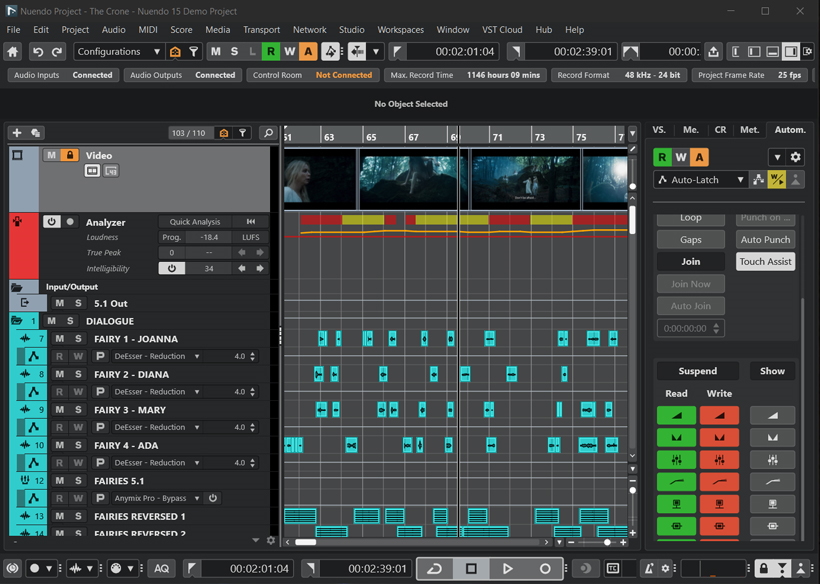
At the end of March 2026, Steinberg unveiled its Nuendo update. Some of the new features had already been implemented in the Cubase 15 Pro update, which we have also tested. Here, we would like to focus primarily on the newly added Nuendo features.
Installation and Licensing
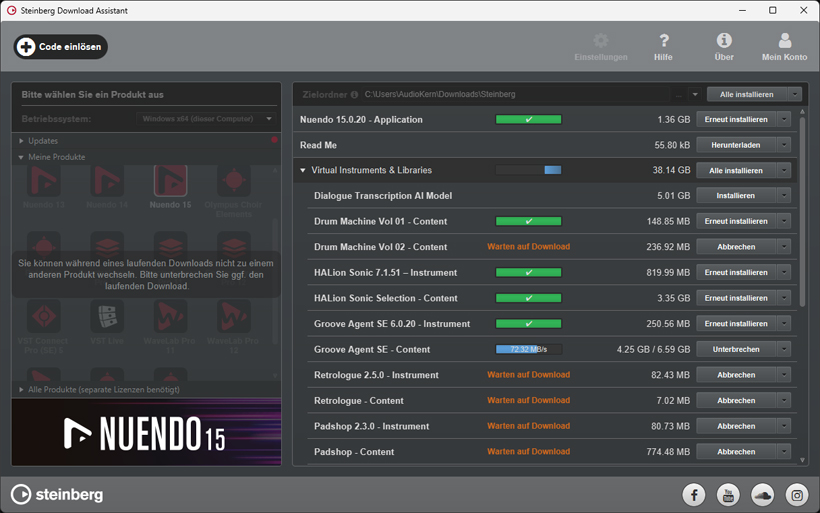
Installation is performed using the Steinberg Download Assistant. Here, you enter the code you received, and Nuendo can be installed and activated on up to three computers. A Steinberg user account and internet access are required for the installation and activation process.
The requirements for running on 64-bit Windows operating systems are at least Windows 10 version 22H2 or higher, as well as Windows 11 version 24H2 or higher. For macOS, Sonoma, Sequoia, or Tahoe are currently required.
The hardware requirements for Windows are at least an 8th-generation Intel Core i5 or AMD Ryzen 3000 series, or Windows on ARM processors. For macOS, the hardware requirement is an Intel Core i5 (late 2018 or later) or Apple Silicon. Additional minimum requirements for operation on both operating systems are 4 CPU cores, 8 GB RAM, 100 GB storage space, and a screen resolution of 1440 x 900.
User Interface and Usability
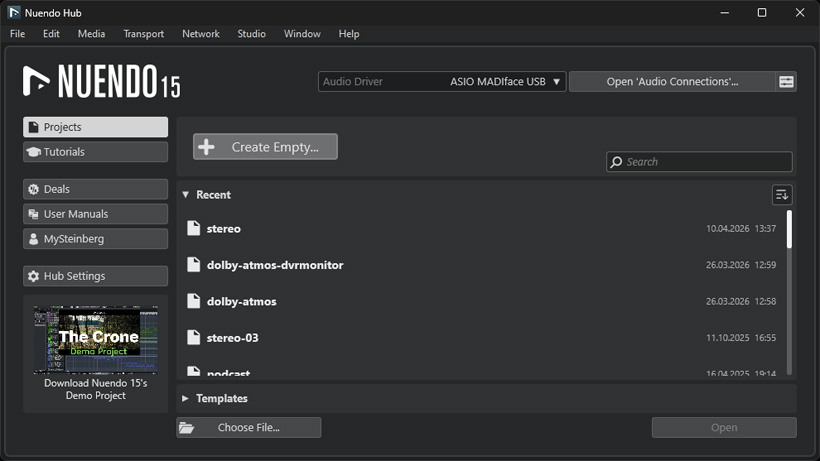
Project management in Nuendo Hub is now more clearly organized thanks to scalable panels. On the left are tabs for project views, tutorials, manuals, and Hub system settings, creating much more space for displaying project files on the right side. Details on system and project information can be displayed here using customizable search and filter criteria for direct access to existing projects. A handy feature allows you to directly adjust audio settings for project playback and play short previews of previously opened projects. This makes it easier, for example, to quickly identify differences between project versions.
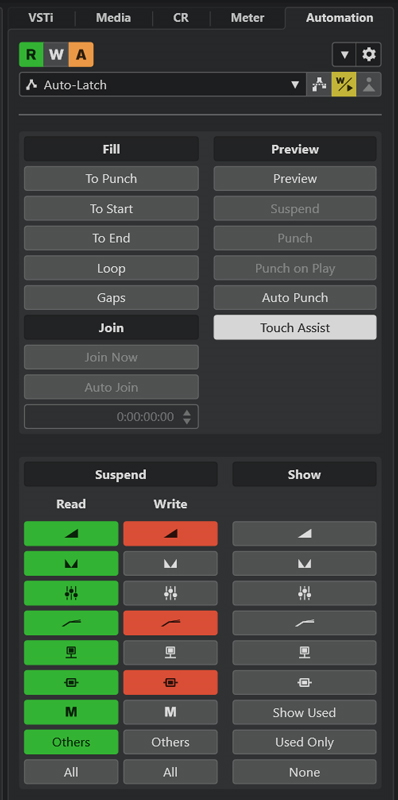
In addition to the automation panel, which can now be permanently displayed vertically to the right of the project window for a convenient view of all automation track parameters, the automation system has also been expanded with several practical features.
For example, clicking on the parameter name of an automation track directly opens a selector with an integrated search function, and the new Write-on-Play mode allows you to set parameter values with ease while playback is paused. When playback starts, these values are then automatically written to the corresponding automation track.
Another practical feature is the ability to copy and paste automation data from individual parameters, single tracks, or all tracks.
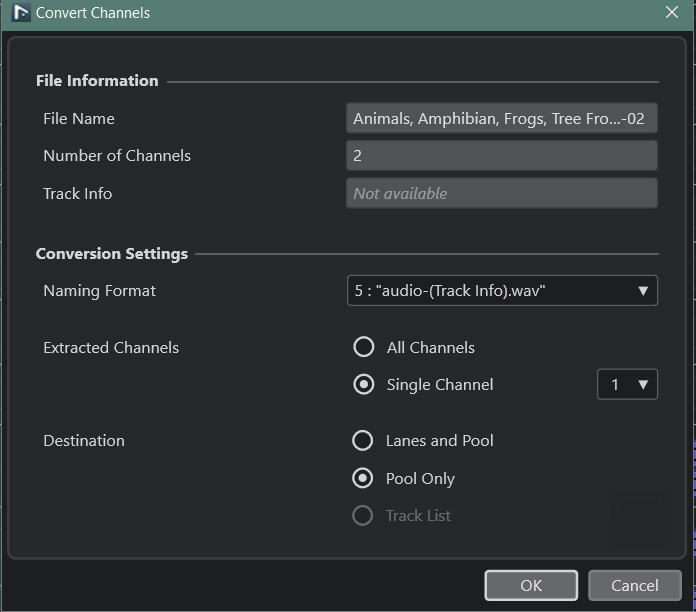
Mix variations with different channel configurations are often required, especially in multichannel productions. The new “Convert Channels” feature simplifies the conversion of audio setups. Selected audio files can be split or combined for the desired mix in a pop-up window. For example, mono tracks can be grouped in pairs, while stereo tracks can be split into mono tracks. Placement and channel routing occur automatically, which is particularly useful when converting stems.
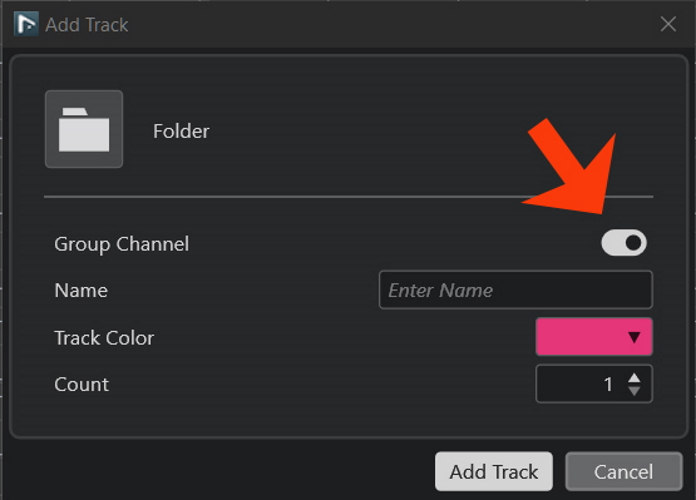
A sum track can now be defined for each folder track, enabling a structured submix without manual routing. When tracks are added or removed, the routing is automatically updated, and the Mixer view changes accordingly. This helps you maintain an overview even in complex projects, and automation routing - particularly for film soundtracks involving groups such as sound effects, atmosphere, and dialogue passages - is greatly simplified.
In addition to the new features mentioned above, Nuendo 15 has also received numerous other improvements, such as the status display of the current buffer size in the audio setup, or the redesigned Plug-In Manager, which provides a clear overview of the VST plug-ins in use.
In addition, marker attributes are displayed more clearly in the redesigned Marker Editor, making them easier to assign. The Quick Audio Export feature is also handy, allowing you to quickly create mixdowns with defined settings without having to place locator points first. Small but powerful: the track display in the Inspector now features a vertical level control that allows you to adjust the track’s volume without selecting the track.
With the AI-powered Stem Separation feature, you can now quickly and easily extract individual tracks from an audio file into the categories Vocals, Drums, Bass, and Other. The newly created audio tracks are automatically generated and can then be edited separately. If the quality isn’t sufficient, SpectraLayer Go delivers better results thanks to its broader range of features. However, the learning curve is steeper, and the processing takes longer.
Plug-ins
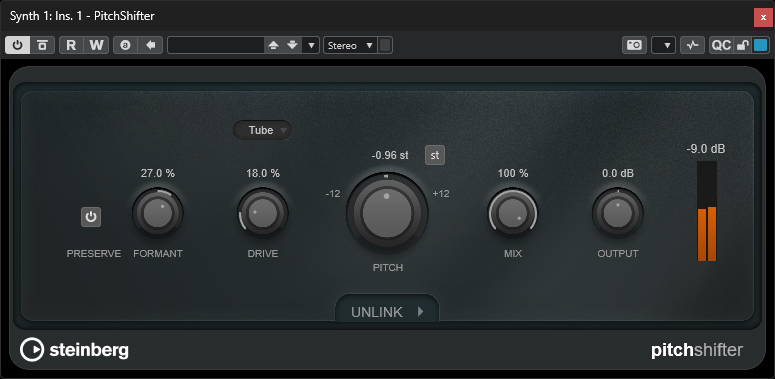
A new plug-in is the PitchShifter, which features three drive modes: Tape, Tube, and Distortion. The formant parameter allows you to adjust the timbre at the input. The control range is one octave up and one octave down. The “st” button limits the pitch shift adjustment to semitones.
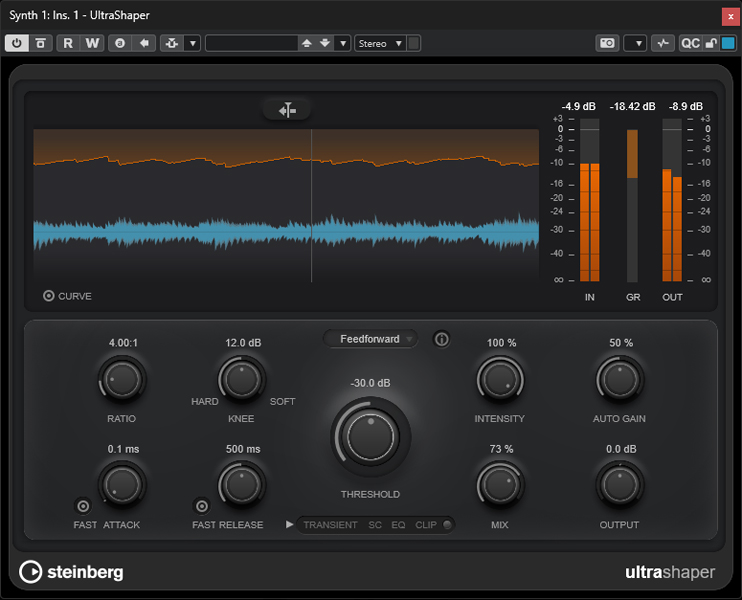
Another new plug-in is the UltraShaper, a dynamic compressor that automatically adjusts the make-up gain to ensure a consistent output level. It also features a clipping function that allows for additional sound shaping in addition to level limiting.
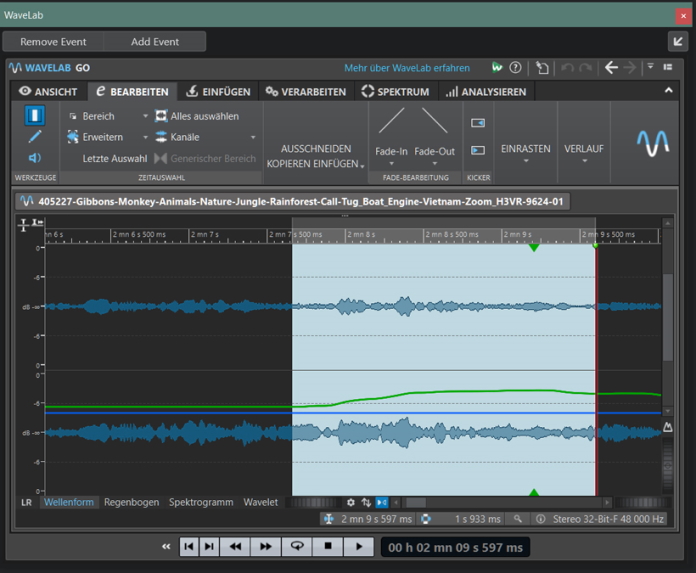
WaveLab Go is a component of Nuendo 15 and includes several audio features from the paid mastering software Wavelab. Thanks to the ARA 2.0 interface, detailed editing steps, such as level analysis, spectral visualization of noise, and mastering, can be performed in real time at the audio event level.
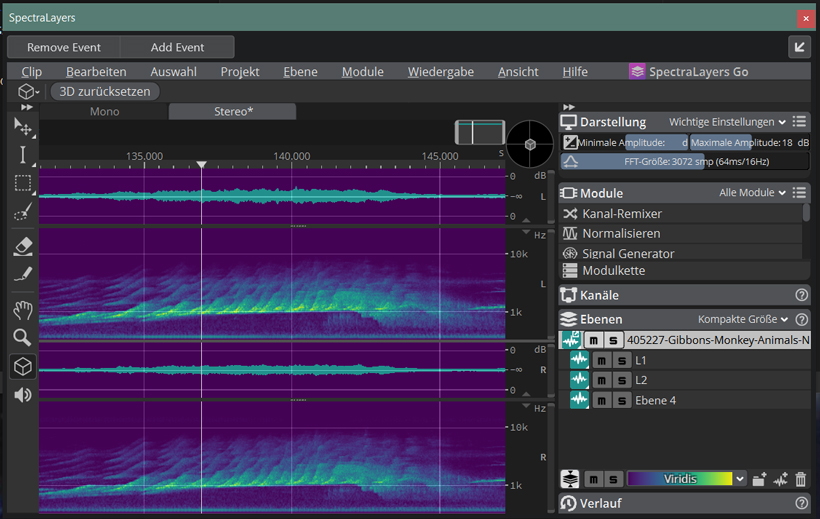
While WaveLab Go allows audio editing with waveform display, SpectraLayers Go - which can also be installed as an ARA 2.0 extension in Nuendo 15 - is capable of performing audio edits at the event level based on visual layers. This “streamlined” version of the standalone program SpectraLayers Pro - which is also a paid product - includes several repair tools that are particularly useful for fixing clicks, hum loops, sibilance, or tailing reverb that cannot be resolved with conventional EQ settings and level adjustments.
Furthermore, in the current version, AI algorithms can be used to decompose audio files into different layers, allowing the Vocal Unmixing feature to separate vocals from background noise at various quality levels - a “lifesaving” measure in post-production when only a stereo recording was available for a key scene.
Both editors are standalone programs that intervene in the signal path via the ARA interface. Therefore, both must be installed separately, which takes up additional storage space.
Video-related features
Nuendo 15 can now import not only ADM files in MPEG format but also video files in the MXF container with OP1a or OP-Atom format. The Material Exchange Format was developed specifically for use in professional broadcast and post-production environments, and is an SMPTE standard that enables the seamless exchange of data between different hardware and software platforms. Nuendo 15 can import MXF video files that comply with the AVC-Intra or MPEG-2 Essence standards. On the audio side, common multichannel configurations are supported, and a corresponding multichannel audio track is automatically created upon import.
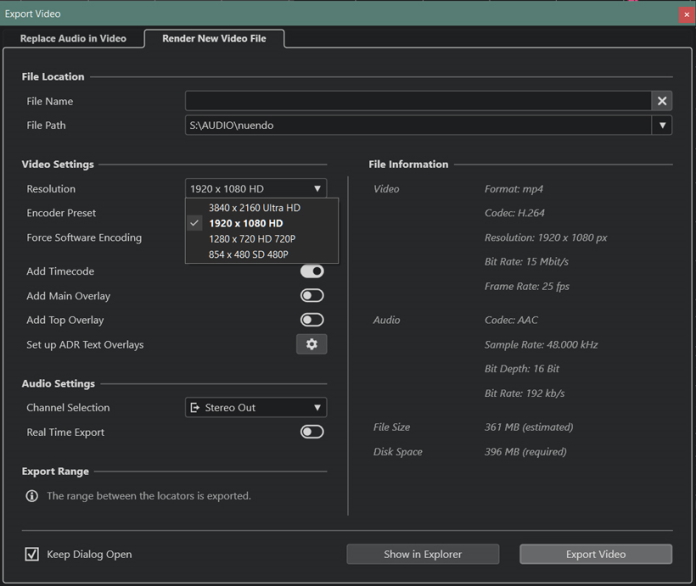
The video export function has also been expanded and is now even more flexible for external image processing or dailies. Four resolution options are now available: 854x480px, 1280x720px, 1920x1080px, and 3840x2160px. The H.264 encoder can utilize existing GPU hardware and offers four presets with quality levels for low, medium, and high bit rates, as well as an editing mode with a small GOP for further video editing in the standard MP4 format. Additionally, depending on image quality requirements, GPU support can be disabled using the Force Software Encoding option. Furthermore, additional data, such as timecode and text overlays for ADR, can be exported in the video stream. On the audio side, only stereo output channels with a 16-bit word length and 44.1 or 48kHz sample rates are currently supported, which necessitates the use of a separate stereo sum for multichannel audio projects.
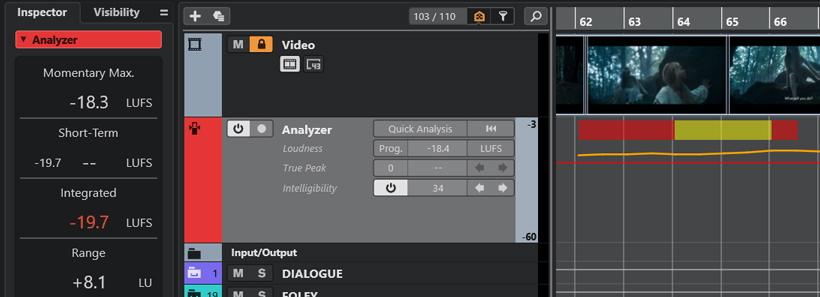
With the Analyzer Track feature, Nuendo 15 offers, for the first time, the ability to check speech intelligibility in dialogue tracks. Based on analysis and detection technologies from Fraunhofer IDMT, critical audio areas can be identified immediately. Threshold values can be set individually according to the specifications of broadcasters or streaming providers.
Using traffic light color coding, the metering display shows in real time and in detail the level peaks, spectral irregularities, and dynamic anomalies, such as clipping, contained in the dialogue track, allowing for faster editing.
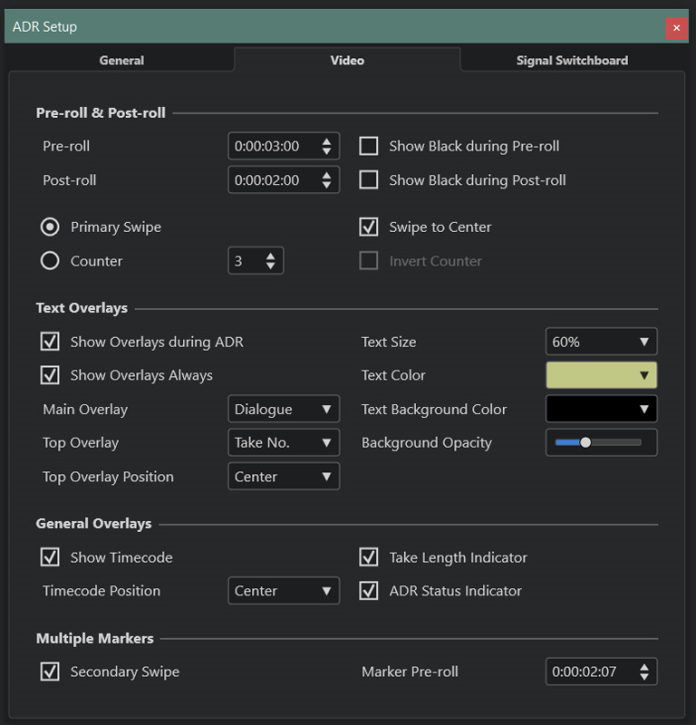
One of Nuendo’s strengths is its ADR function for dialogue synchronization. This has now been functionally revised to allow for more flexible text display. Text sizes, text colors, and transparency can now be adjusted on video displays, such as TV monitors or tablets, and overlays, such as take numbers or timecode can be placed even during recording.
In Practice
Overall, handling multiple tracks felt pleasantly smooth. On our aging Windows 10 system with an Intel Xeon CPU, 32 GB of RAM, and an Nvidia RTX GPU, visual feedback when moving windows, mixer views, and drawing automation curves was fast and smooth. Folder tracks are a game-changer for managing extensive post-production sets anyway, and the sum tracks that can now be created also made it possible to conveniently automate entire subgroups.
The ability to copy automation curves from one track to another via copy and paste was also welcome. The ARA implementation worked seamlessly and unobtrusively in a positive sense. The difference in quality between the “Stem Separation” preset function implemented in Nuendo for separating vocals and the SpectraLayer Go app - which can also run as a standalone application - was striking. Here, the difference in sound was clearly audible due to the adjustable functions and quality levels.
Users who, like the author, utilize configurable macro controllers, such as the Elgato Stream Deck hardware can use keyboard commands to individually adapt Nuendo’s diverse functions for quick audio and plugin editing to their own workflow. In testing, this worked wonderfully, for example, when using SpectralLayer Go.
Conclusion
The price for Nuendo 15 is approximately 1,000 euros, and the upgrade from the previous version is approximately 200 euros. In addition to fundamental improvements to the user interface and several new plug-ins, the focus this time is heavily concentrated on video production and audio-to-video synchronization. But the update is worth it just for the many small improvements in usability alone.