 How to resolve AdBlock issue?
 Steinberg SpectraLayers 13
A New Era in Unmixing and Spectral Editing
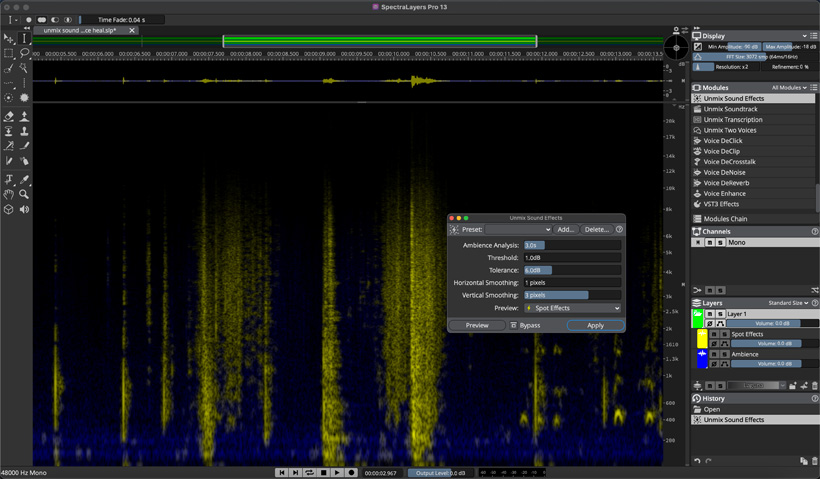
Steinberg has today announced the immediate availability of SpectraLayers 13, which builds on the application’s core strengths with powerful new algorithms and tools. Alongside several user-requested improvements, the enhanced creative unmixing, speech refinement, audio reconstruction, and noise control features make SpectraLayers 13 ideal for integration within all contemporary workflows, marking a new era in unmixing and spectral editing.
Unmix Sound effects
SpectraLayers 13 features a brand-new process which separates short sounds from continuous environmental and ambient background sounds, such as wind, crowd, traffic, and nature. Unmix Sound Effects is ideal for audio post-production, as it enables fast, precise isolation of a wide range of sounds and extracting them to a dedicated layer. It does this while retaining the background texture, which can then be shaped and smoothed using other new processes.
Ambience Heal
The new Ambience Heal feature significantly improves the spaces left in the audio spectrum by unmixing and cut-to operations. The gaps previously occupied by voices on a source layer, for example, can be automatically filled with the sounds of the environment or room tone which are already present.
More new voice processing tools
SpectraLayers 13 features three new tools to enhance the clarity and processing of voice recordings. Unmix Two Voices lets the user automatically separate two voices, without having to register voice profiles, while Voice DeCrosstalk allows individual non-target (background or foreground) voices to be separated from the primary voice, even when they overlap. Meanwhile, Voice DeClick removes unwanted mouth noises like accidental lip smacks and tongue clicks. Workflow speed and efficiency improvements like these are a hallmark of the new edition.
Spectral data resynthesis
A new Reconstruct module resynthesizes selected spectral data, tracking before/after selections to reconstruct tones and above/below selections to reconstruct transients and noise. The reconstruction amounts are configurable for all three components, delivering an extremely versatile fine-tuning process.
Paste enhancements and dynamic fade shaping
There have been several improvements to paste operations in SpectraLayers 13. These include Paste Into Selection, which is ideal for repeating or replacing events in the timeline. A selection-length period of time can be easily added to the active layer with the Paste Insert tool, while the Time Fade and Frequency Fade sliders can now be used on active selections, complementing the upgraded paste and other selection upgrades.
Level checking
A variety of loudness data can now be quickly calculated and displayed, including True Peak and a host of LU measurements. Calculations update automatically and can be made on spectral selections, as well as any combination of layers.
More flexible batch processing
SpectraLayers’ full range of sophisticated batch processing options can now be applied across multiple open projects at once.
Improved Pro Tools compatibility
In conjunction with the new batch process project tabs, the Pro Tools AudioSuite Bridge plug-in now includes support for round trip editing and processing of multiple audio clips at once, supporting both Dolby Atmos (up to 9.1.6) and Ambisonics formats.
And there’s more
SpectraLayers 13 introduces even more workflow improvements, many requested by users:
- Fades can be applied to selections within single layers, or crossfaded between two different layers.
- A new corner-based handle allows selection of time and frequency coordinates to be adjusted simultaneously, making selecting and positioning content in the spectrum faster and more flexible than ever.
- Relatively high amplitude content can be attenuated within selections, based on the maximum spectral power of the surrounding content.
- Selection fades can now be switched on and off via menu or shortcut commands.
- Selection events can be excluded from being logged in the History panel, allowing the preservation of existing selections while undoing or redoing other events.
- Modules can quickly be located directly by name or keywords describing associated categories, functions, or concepts.
- User interface layouts can now be saved and recalled for frequently used scenarios.
- Keyboard shortcuts for more than 100 functions — including interface layouts, tool presets, module presets, and module preset apply commands — can now be assigned.
- New metering options include the VU meter now being able to display peaks, RMS, or loudness and a dedicated module which dynamically provides loudness data for entire projects, any combination of layers, or spectrograph selections.
- SpectraLayers can now integrate audio devices mapped beyond 128 device channels.
- The Unmix Transcription module can export to more frame rates, for highly accurate and easily editable transcripts.
- When Tooltips are active, hovering over a module or a module help icon displays descriptions of its functionality, keyboard shortcuts, and more.
"With SpectraLayers 13 we’ve streamlined the experience to better fit today’s fast-paced, interconnected post-production workflows. It makes it easier than ever to move seamlessly from problem to solution,” says Senior Marketing Manager Pro Audio, Luis Dongo. “This release again highlights what makes SpectraLayers unique — surgical in its editing precision, yet very fast and intuitive to use.”
Availability and pricing
SpectraLayers Pro 13 and SpectraLayers Elements 13 are available from resellers and through the Steinberg Online Shop. The suggested retail price for SpectraLayers Pro 13 is 359 euros or app 360 US dollars. An education version is available with a suggested retail price of 199 euros or app. 200 US dollars. The suggested retail price for SpectraLayers Elements 13 is app. 90 euros or US dollars.
Updates to SpectraLayers 13 Pro from previous versions of SpectraLayers Pro, upgrades from SpectraLayers Elements and SpectraLayers Go (included in Cubase Pro, Nuendo, and Pro Tools), and crossgrades are available. An update to SpectraLayers 13 Elements from previous versions is also available. Prices may vary according to region.
Customers who have activated SpectraLayers Pro/Elements 12 or earlier versions from June 3, 2026, are eligible for a free, downloadable grace period update to the latest version.