 How to resolve AdBlock issue?
 Eventide Temperance Pro
Musical Reverb Plug-in built on Modal Technology
Author: Lars Deutsch
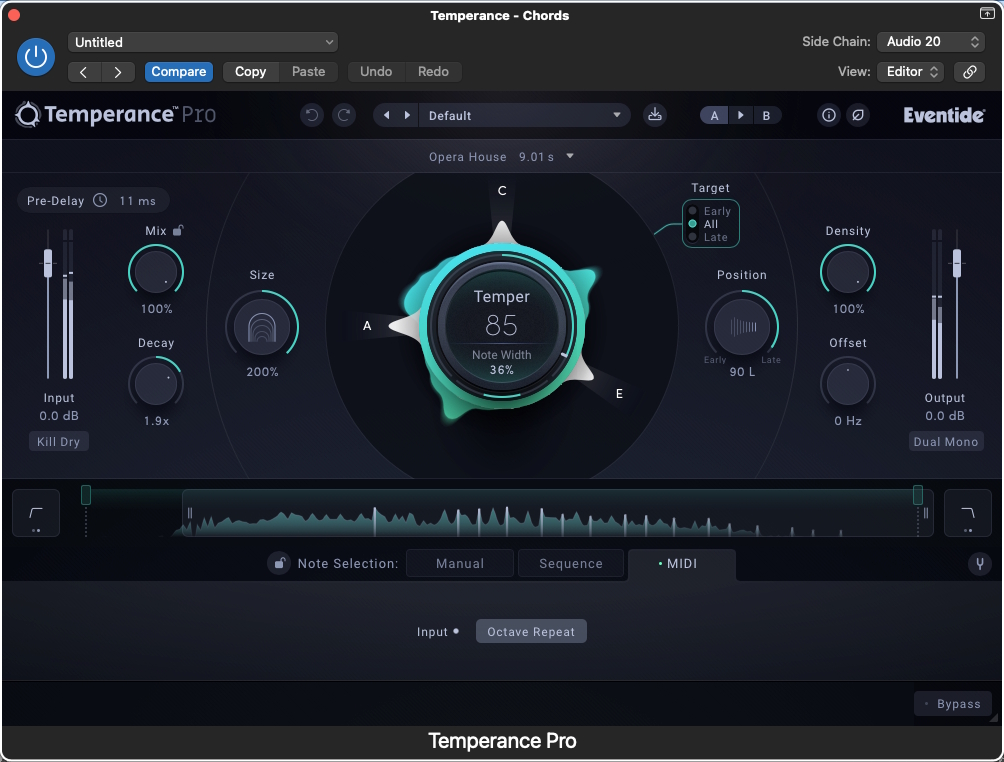
Temperance Pro by Eventide is a modal or tunable reverb with 29 custom spaces and over 120 presets. Branded as the "world's most musical reverb," it operates on the 12-note chromatic scale and is thus able to determine which notes bloom or fade in within space. Built entirely on modal technology, it features expanded controls to set shape to musical texture. Lars Deutsch, who works as a composer, songwriter, and producer, takes a close look at it, covering the installation process as well as practical applications.
Installation Process
Temperance Pro has its own installer, which is available on the Eventide website. Installation is easy, and authorization via iLok was simple and seamless for me. Temperance Pro works with all major DAWs on Windows 10 or higher and MacOS 10.14 or higher. It is available as 64bit AAX, VST3, and AU plug-in versions. The installer offers the option to install all of them or only what you need.
Concept
Temperance Pro can be used like a regular reverb - and just like Blackhole Immersive, it sounds great. However, the reason Temperance Pro is unique is its concept of a tunable reverb.
The GUI of Temperance is clear and simple, offering not only reverb staples like mix, decay, size, and density, but also a central dial that controls and displays which pitches are favored and how narrow the focus on these pitches is. Automating the note width dial allows for a seamless transition from tradition to very precisely tuned reflections.
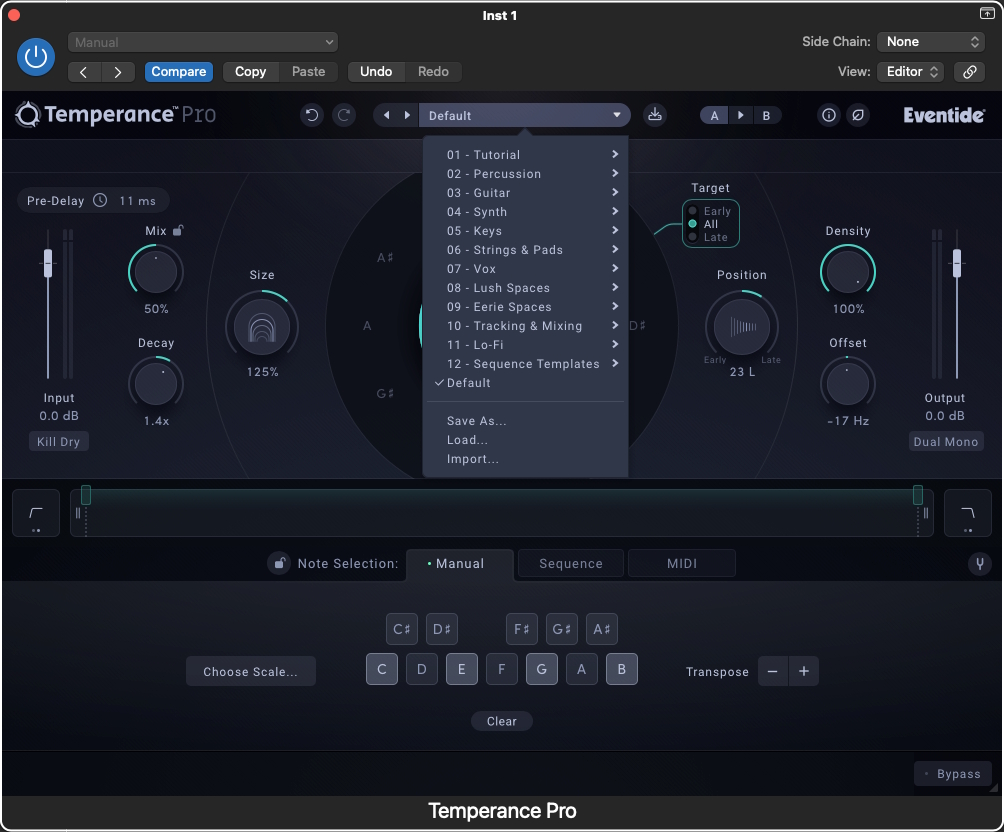
There are a number of ways to control the pitch of the reverb. For my uses, I used it like a vocoder, feeding it with a MIDI file, but you can also choose the key of the song, for example. The note selection and the mix button can be locked, so that clicking through presets will not change these parameters.
It is possible to tune all or focus on early or late reflections. Each option has its own color scheme. The offset button adjusts the reverb pitch against the original material. There is also a convenient slider that functions like a low and high cut for the reverb. The user has the choice to go by frequency or by pitch using a separate slider. The frequency option comes with two different slopes.
The preset browser includes a couple of tutorial presets and good showcases for Temperance Pro. Below the presets browser is the browser for the 29 available spaces.
In Practice
I mainly tested Temperance Pro in Logic on the last Intel MacPro with 16 cores, but also on a Silicon laptop. CPU usage was not an issue on either computer.
In the past, I have tried using a combination of filters and plug-ins to create something similar to a tunable reverb. One of those workflows included a vocoder, the suppression of the harsher frequencies and feeding that signal into a reverb. Another one was with an automated surgical EQ, so I was happy to see that someone spent a couple of years to dial in a proper tunable reverb. My first two times using Temperance Pro were to solve problems on projects I was working on. The presets are well designed and very useful. In my personal workflow, I ended up dialing in what I wanted by choosing the space first and then adjusting the parameters by ear. The well-designed and intuitive GUI makes adjustments easy.
First, I recorded a very fluid jamming live band for an artist. We needed a thicker and dreamier sound, maybe like a gentle support from a keyboarder. I fed the chords of the song via MIDI into Temperance Pro and dialed in the reverb of bass, keys and background vocals until the sound was somewhere between a gentle, constantly morphing pad and the most beautiful tuned air around the performance. For the outro of the song, I faded out the dry signal and let the tuned reverb take over. Temperance Pro allowed me to reflect the nuances of the performance in tune with the song. The effect felt organic, and the reverb did not call attention to itself; it rather just blended with everything. To carve out the chorus musically, I gently fed more nuance into the chords by adding polytonality higher up in the reverb right before the chorus.
My second usage was when a client presented me with a high and aggressive female choir vocal cluster. The client loved that specific sample. To integrate it into a composition, I fed Temperance with MIDI notes to tune and mellow out this harsh sample, but most of all to turn it from a static to a moving part of the composition. Further down the road with this composition, I automated the offset dial in Temperance Pro to make the reverb rise like a riser.
These are just two examples of how powerful this plugin can be for your workflow.
Conclusion
For composers, producers, and mixing engineers, Temperance Pro provides control and problem-solving that was previously not available. My one note would be that I would have appreciated a gate. To be fair, most reverbs do not come with a gate or an IR cut, but the combination of big space with a shorter, gated, or easier-to-control tail would have been great.
Before I was thinking about writing about a Temperance Pro review, it had replaced pads, vocoders and the harshness a vocoder can bring. I also dialed in the Opera space so whatever I feed into it almost comes out like a distant choir that responds to the nuances of the rest of the arrangement. Automating the offset value has become a go-to for to add transitional effects and subtle rises or drops.
I appreciate that I can turn a solo a capella vocal into its own accompaniment, make harsh and static samples play ball in a composition, replace flat and dull pads with organic movement and thicken anything more musical than before.
Temperance Pro is available on Eventide’s website for $179. Temperance Lite was initially available as a free download and is now priced at $49. Temperance Lite cannot be controlled by a MIDI file like a vocoder, and it has fewer spaces. Having said that, it is still possible to automate chord changes, so even the light version can be a powerful tool.