 How to resolve AdBlock issue?
Dawesome Abyss 2
Sound is Colour
Author: Peter Kaminski
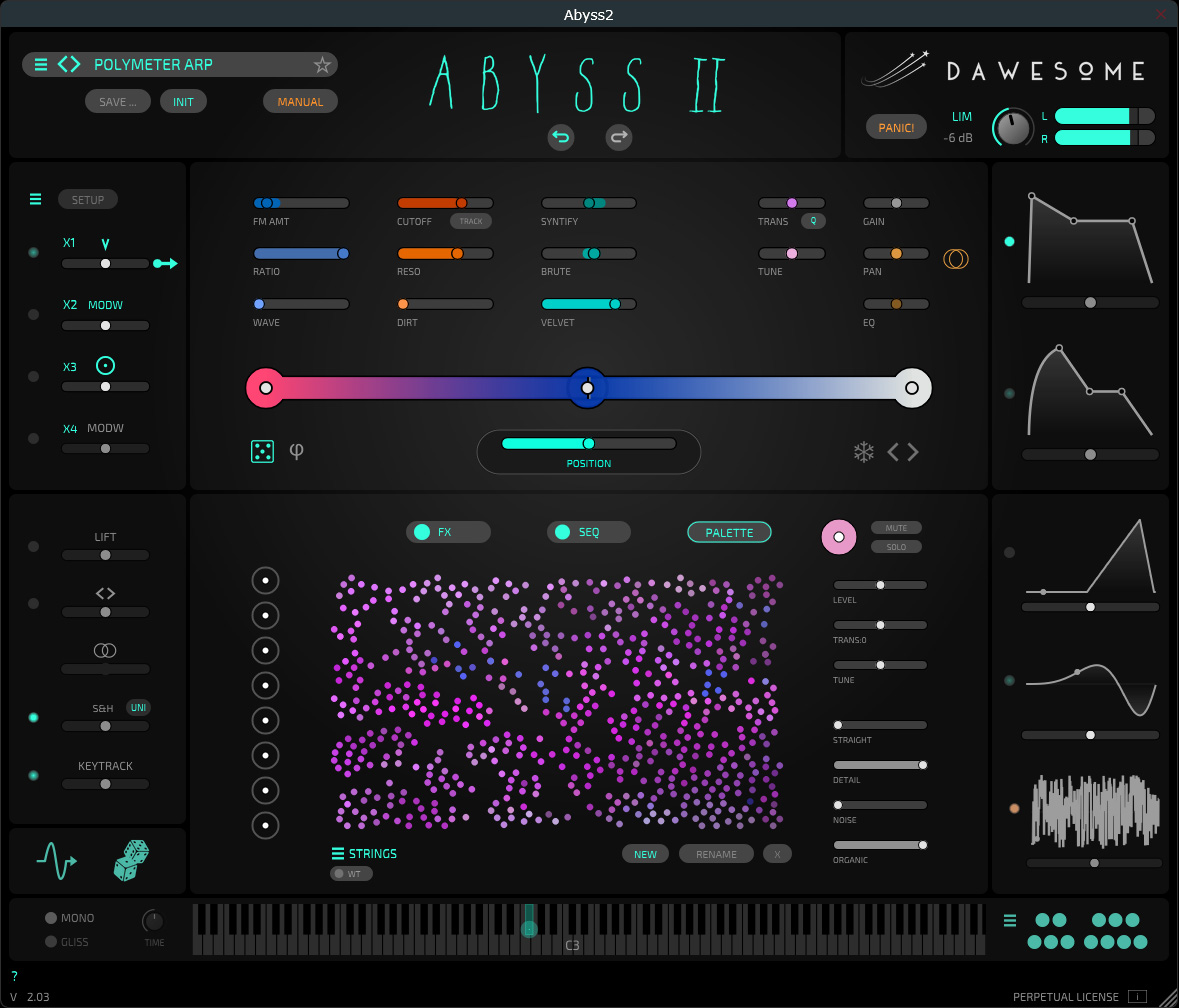
Five years ago, Peter Vorländer - aka Dawesome - introduced Abyss, his first virtual instrument. The Abyss 2 update has been available since September 2026. Since we haven’t covered Abyss yet, we’re offering a comprehensive overview of this extremely interesting and completely revamped synthesizer with this review. Anyone interested in Abyss 2 should also check out our review of the virtual instrument Kontrast.
Installation and Licensing
Like all Dawesome instruments and plug-ins, you can now purchase and download this one directly from Dawesome. After the download, you can install it using an installer, or - as an option - redeem a code in a Tracktion account and install it using the Tracktion Downloader, though purchasing directly from Dawesome is the simpler route.
The virtual instrument is available in the VST3 and AAX plug-in formats for Windows 10 and 11, as well as for macOS version 10.13 and later, where it’s also available in the AudioUnit plug-in format. If you’ve received an activation code from Dawesome, you can simply enter it in the demo version after launching the plug-in, and the licensing process is complete. With one license, you can use Abyss 2 on up to three computers. For our test, and the screenshots, we used the VST3 plug-in on Windows 11.
Concept
With Dawesome’s virtual instruments, the concept centers on making complex sonic functions easy to use. This is certainly true of Abyss 2, where colors help symbolize sonic similarities and characteristics. In Abyss 2, a “palette” provides a wide variety of sounds, which are represented as individual “sound colors” in the form of colored dots. These points can be placed along a gradient along a line. Sounds between the points on the gradient are interpolated according to their position on the gradient. There are pre-made palettes, but you can also resynthesize samples and then place them as points on the gradient - and creating your own palettes is also possible.
Operation

Let’s take a closer look now at the virtual instrument’s GUI. At the top on the left is the preset selector, and on the right is the audio output section with level control, peak level bar graphs, a switchable limiter, and a “Panic” reset button - in case something freezes or goes wrong.
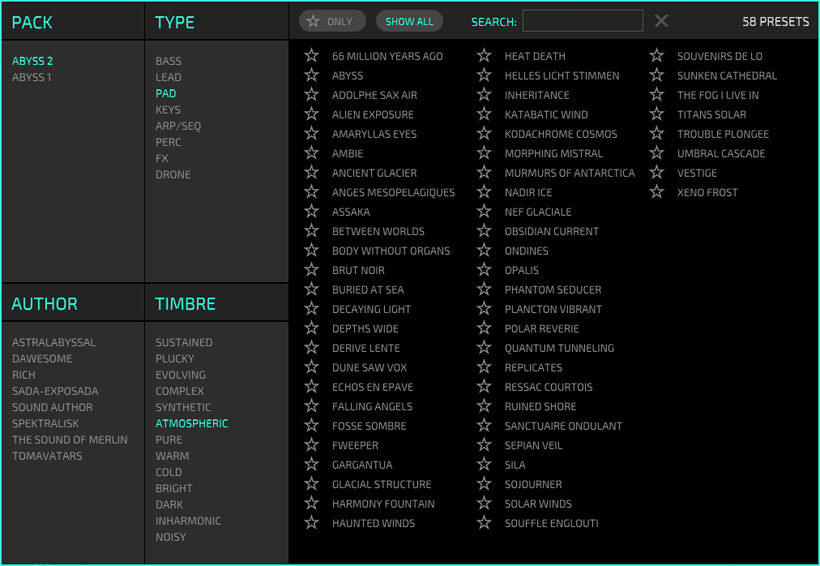
As with Dawesome, the preset browser (see image above) is always very user-friendly, meaning that it allows you to quickly search for sound packs, sound types, preset authors, or sound colors - even in combination. You can search by entering a name, and you can also mark presets as favorites by clicking the star next to the preset name.
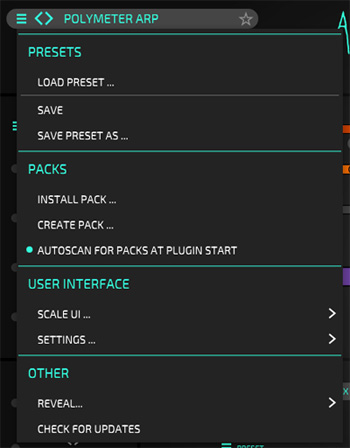
A menu (see image above) allows you to load and save presets, install packs, set the GUI size to fixed values, check for new updates, and more. Incidentally, the size of the plug-in can also be scaled continuously using a computer mouse.
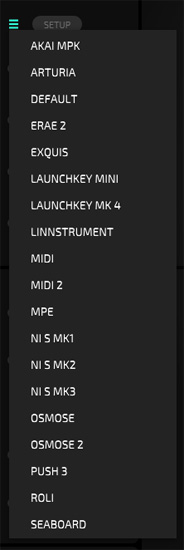
Through another menu, the user can select specific MIDI setups or specific MIDI controllers. It’s important to note that Abyss 2 also supports MPE.

The keytracking modulation source can be adjusted very flexibly using a curve; if needed, you can add additional control points to customize the keytracking modulation curve relatively freely.
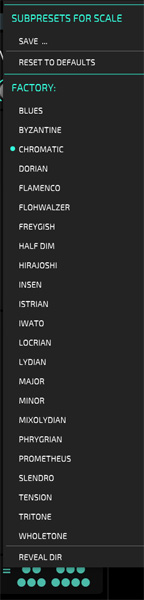
Speaking of the keyboard, scales can also be selected or created through a menu. The scales define which semitones should be playable.
Parameters und Modulation
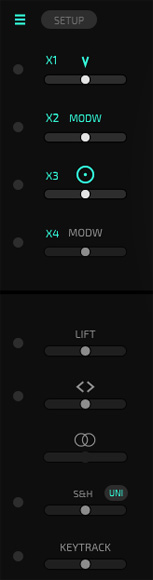
On the left side are various modulation sources that affect different predefined parameters. Routing modulation sources to targets is not required. When you select a target parameter with the mouse, all assigned modulation sources are displayed with their corresponding values and can be adjusted directly.
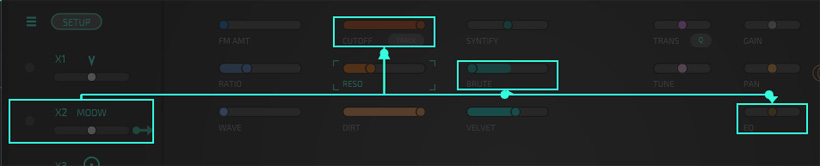
If you click the arrow that appears on the right next to the modulation source when you hover over it, a visual representation (see figure above) shows which parameters this source affects.
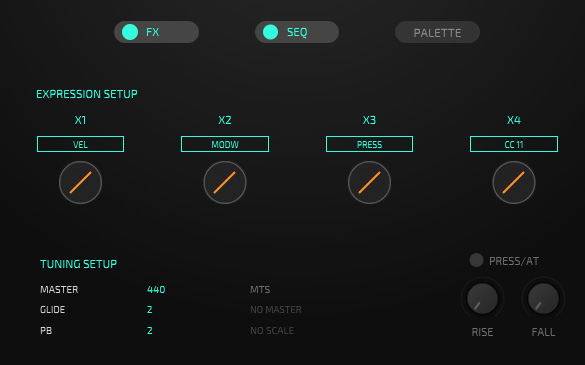
Clicking on one of the four sources (X1 through X4) opens an additional settings dialog in the lower section (see figure above).
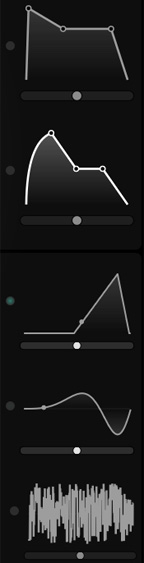
On the right side, the following additional modulation sources are available: two envelope generators, two LFOs, and a sample & hold/random generator.
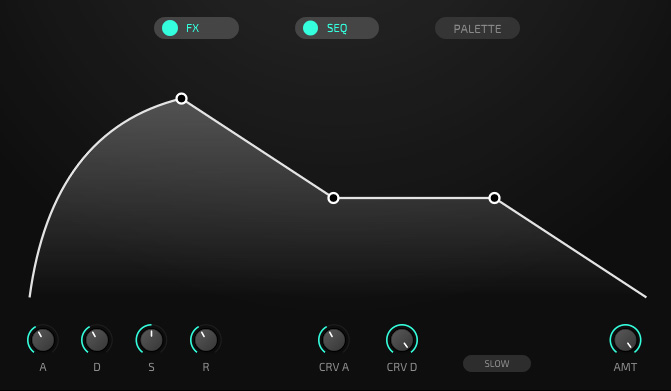
When you select one of these sources, an editor for the selected source (see figure above) appears in the middle section of the GUI, displaying the corresponding parameters.
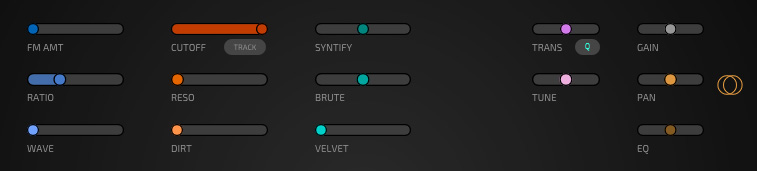
In the center of the upper section, you can see the parameters that can be adjusted and modified via modulation.
Palette and Gradient
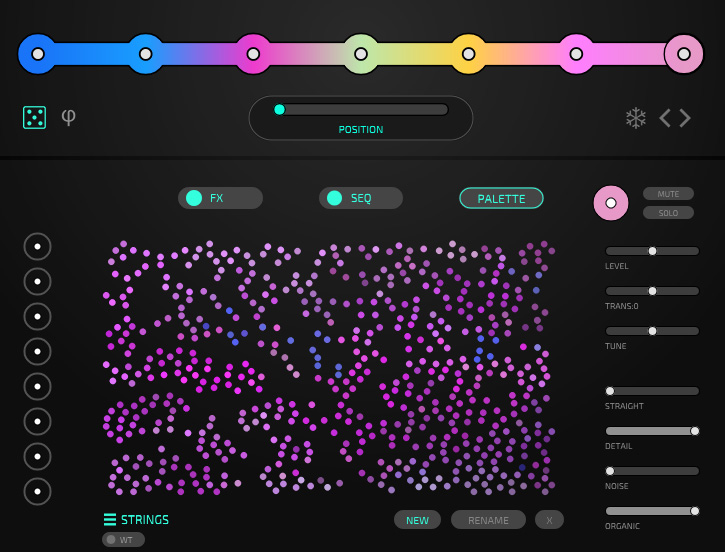
Now to the core of sound generation in Abyss 2. In the figure above, you can see the palette with the individual tone colors and, above it, the gradient - in this case, with seven tone colors stored there. To the right of the palette are several parameters for modifying the tone colors.
When you move the mouse over an area or a specific tone color, you’ll hear the current tone color. Tone Colors that sound similar are represented by similar colors. If you select a Tone Color by clicking on it with the mouse, it is displayed at the top as a larger circle and can be dragged with the mouse to a specific position on the gradient. Since the current gradient position can also be modulated - for example, via an envelope - you can achieve very dynamic sound transitions. You can also place eight Tone Colors on the left side next to the palette. Own palettes can be created by dragging and dropping into a palette, but you can also drag individual samples onto the gradient. The sample is then resynthesized and saved as a Tone Color.
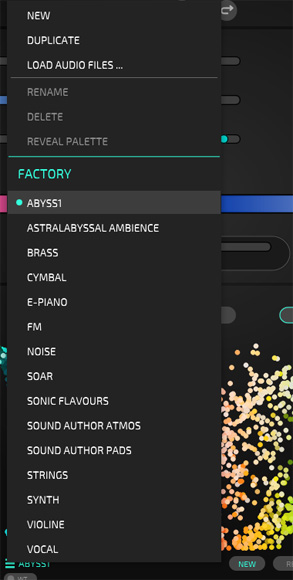
Here in the palette menu, you can see how to manage the palettes and access specific palettes. Compared to the first version of Abyss, this version offers significantly more flexibility with multiple selectable palettes.
Effects
Abyss 2 also offers a wide range of effects. Up to four effect slots are available. An effect can be moved to another slot using the mouse, allowing the user to easily change the order of the effects.
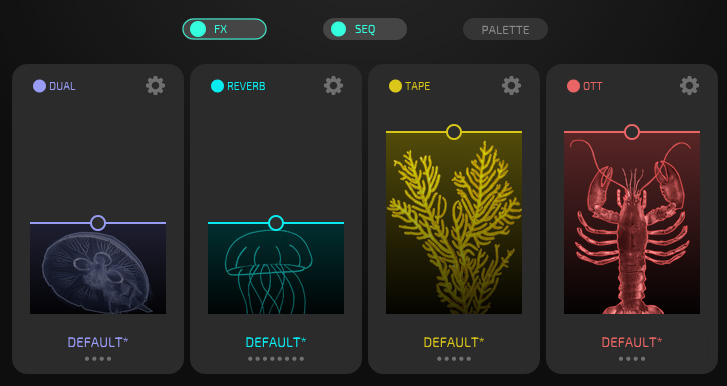
Clicking the dial icon opens the parameter page for the respective effect (see figure below).
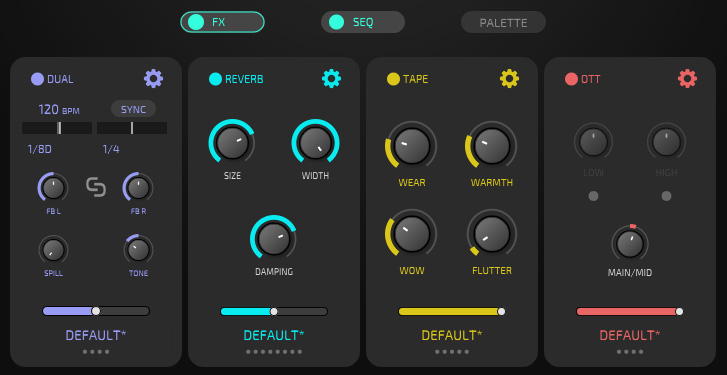
Presets are also available for each effect via a menu, and users can save their own presets as well.
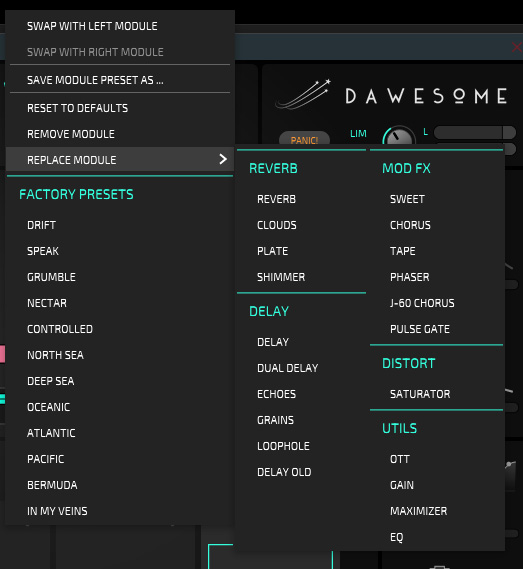
There are 21 different effect types to choose from (see figure above). In addition to various reverbs and delays, chorus, phaser, distortion, equalizer, and other effects are also available.
Sequencer
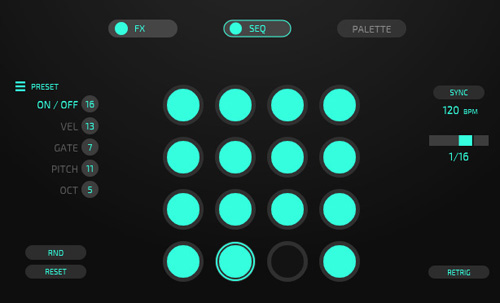
The optional step sequencer features up to 16 steps and can be synchronized with the DAW clock. Each step can be individually enabled or disabled.
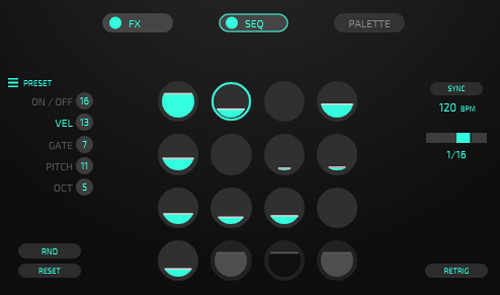
For each step, the user can set velocity, gate length, and pitch (semitone and octave).
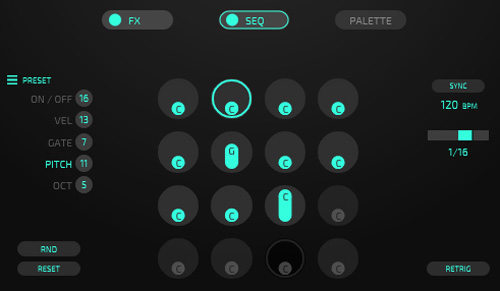
Presets can also be saved and loaded here.
In Practice
We tested Abyss 2 on an AudioKern B14 workstation from Digital Audio Service in Hamburg running Windows 11. According to the Windows Task Manager, the increase in CPU resources required with StageBox 1.2.1 as host software was approximately one percent, and with Steinberg Nuendo 15.0.30, the performance never exceeded 20 percent at its peak during polyphonic playback in a simple project. The required CPU resources are therefore very low.
The Abyss 2 fully succeeds in making complex sound generation as easy to handle as possible through its intuitive interface. The available palettes alone open up an endless variety of sound possibilities, and it’s incredibly easy to load your own samples into Abyss 2. The number and sonic range of the factory presets are very extensive. All of the presets from Version 1 are still available in Abyss 2, but there are now more than twice as many presets available - a total of 447. Version 2 has added quite a bit, and not just in terms of presets and palettes.
AMong the new features in Version 2 is the ability to use your own samples to resynthesize them on the gradient or within the palette. There are also 16 new effects, and sub-presets are now possible within each individual effect. Other new features include modulable envelope generators, an improved preset browser, random parameterization, extensive controller setup, and much more. So, the new version is definitely a massive update.
Sonically, the amazing sounds are particularly well-suited for ambient and film music - especially the pads and drones - but you shouldn’t underestimate the other types of sounds, such as bass and solo sounds, as well as percussive sounds. There are some truly remarkable presets included - and thanks to the software’s design, you can now create your own presets in Abyss 2 extremely quickly. The sequencer is simple in terms of its feature set - for example, it doesn’t offer directional changes, real-time randomization, or ratcheting - but it fits perfectly into the overall concept: keeping complex functions simple.
Conlusion
The price for Dawesome Abyss 2 is 149 euros, or just 45 euros as an update for owners of the first version - and both are excellent deals. I can hardly imagine anyone wanting to do without the new features and possibilities of Version 2. In terms of sound, I find Abyss 2 to be excellent and a must-have for users in the ambient and film music genres.